


Every order from every store, in one list
Orders from your connected store arrive in OrderKrab, so you have one place to see them, filter them, and act on them.
- Shopify and WooCommerce
- Unlimited stores on one account
- Search, filter, bulk actions
- Included in every plan
Orders
All stores
- 1046Waiting for Packing
Ieva K.
krab-store.myshopify.com
- 1045Waiting for Packing
Tomas B.
krab-store.myshopify.com
- 1044Needs Attention
Anna S.
krabstore.lt
- 1043Completed
Jonas P.
krabstore.lt




Selected: 2
The order list
All orders in one place
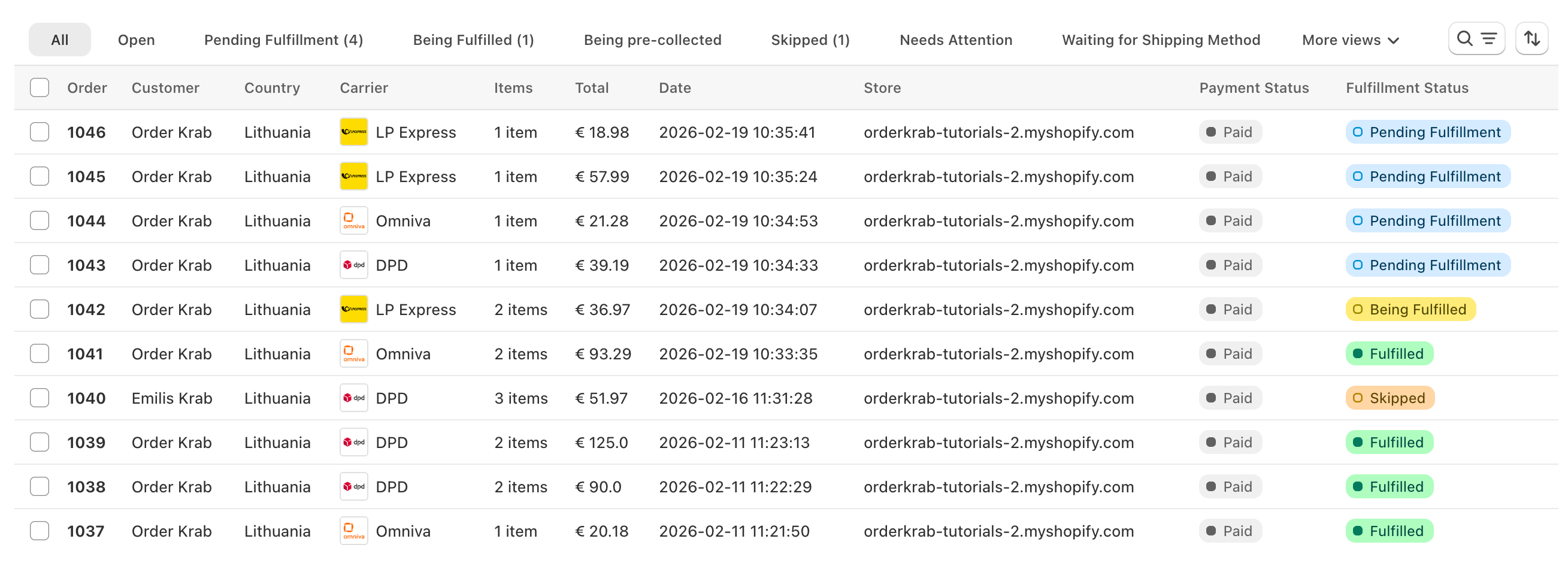
Orders from your store arrive in one list, where you can filter them, search them, and act on them. From there you print labels or start Pick & Pack without switching apps.
Search
Type an order number, a customer name, an email, or a tracking code. Results appear as you type.
Views and statuses
Switch between All, Open, Unfulfilled, and Archived, or open one status such as Needs Attention. Each view shows a live count.
Filters, sort, and columns
Filter by store, carrier, location, or tag. Sort by date or order number. Choose the columns you want to see. OrderKrab remembers your view.
Bulk actions
Select orders and act on all of them at once: create the shipping labels, download them as one PDF, set the orders as fulfilled, or archive them.
OrderKrab shows only the actions that are valid for every selected order, so a mixed selection never does the wrong thing.
Statuses
What do the different statuses mean?
Every order carries a status that says what happens next and which actions are available. The main path has five steps. Everything else is a side track the order comes back from.
The main path
- Processing
The system is preparing this order.
- Waiting for Shipping Method
The order is in OrderKrab but has no shipping method yet.
- Waiting for Packing
The order is in the packing queue and nobody has started it yet.
- Being Packed
Someone is picking or packing this order right now.
- Completed
The order has been sent, or collected by the customer.
Other statuses:
- Needs Attention
- Items Not Ready
- Skipped
- Waiting for Payment
- Cannot Be Processed
- Waiting for Picking
- Being Picked
- On the Way to the Store
- Ready for Pickup
- Cancelled
- Refunded
Completed means packed and handed to the carrier, not delivered. To follow the parcel, use the tracking code on the order.
Krab AI explains confusing carrier errors and fixes them in one click
Carrier systems return errors like "size must be between 0 and 50", which tell your team nothing. Krab AI knows what each carrier means, explains the problem in plain words, and offers a fix you can apply with one click. Orders keep moving instead of getting stuck.
- Catches the rejection right away
- Suggests the exact fix
- You stay in control
One order
Open an order and everything is there
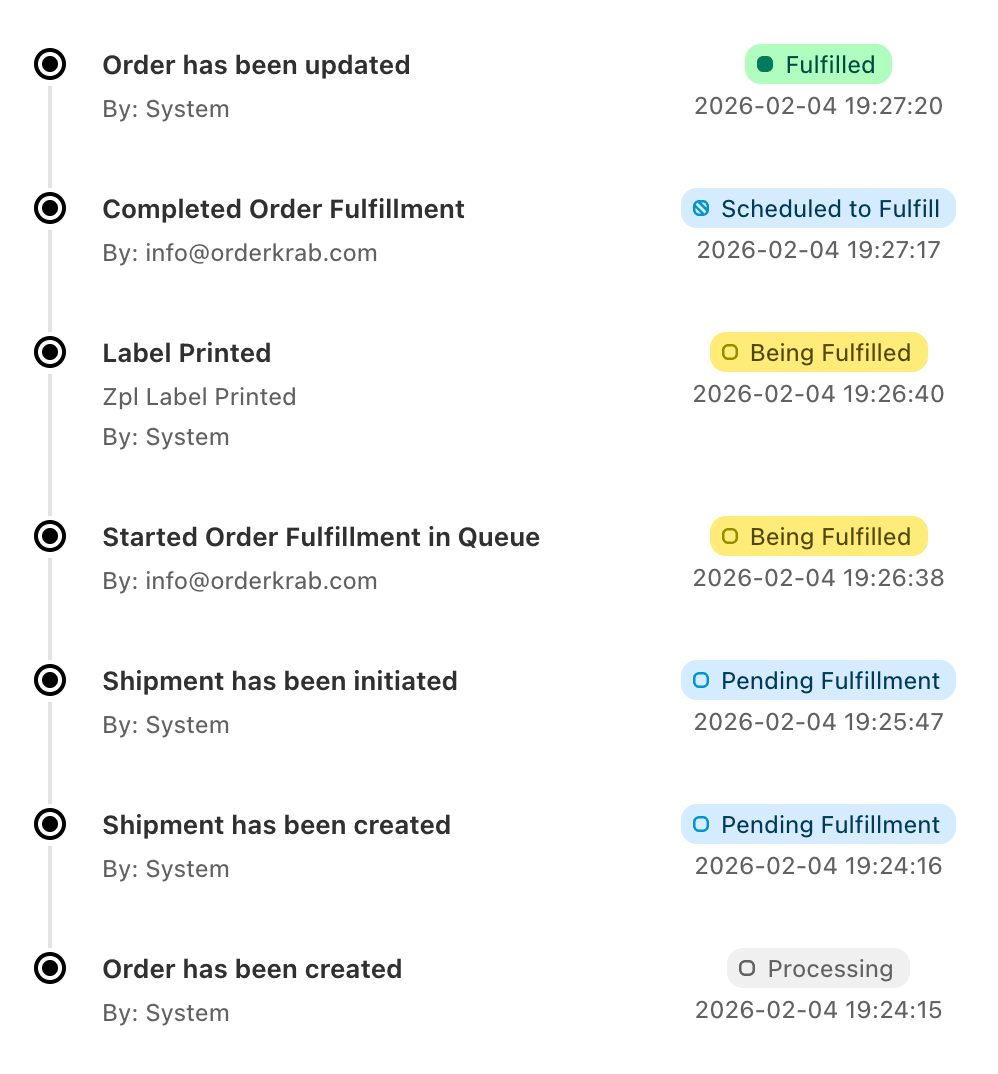
Shipping, items, customer, comments, and a timeline of every action sit on one page. The main button changes with the status, so the next step is always one click away.
Shipping
Set or change the shipping method from the rates available for that address. Fix the address, pick a different locker, or set the customs fields.
Customer
Correct the name or the email on the order. A risk badge and a company badge show who you are shipping to.
Items
Edit the variant text, the line price, or the unit weight. Archive an item that should not be packed.
Comments
Leave a note for the team, with the option to skip the order at the same time. Comments also show inside Pick & Pack.
Action Timeline
Every step is logged with who did it and when: shipment created, label printed, packed, shipped, returned.
Shipments
Add a second parcel with its own label and tracking code, or create a return label with the carrier you chose for that country.
How it works in practice
More than a list. Detailed control over every order.
Three controls handle the messy parts of real fulfillment, so your team does not slow down.
Nothing to pack
Orders that need no packing stay out of the queue
Orders with nothing to ship, such as digital products, get the status Cannot Be Processed. Store pickup orders load only if you turn on the setting for them. You can hide both from the order list and from analytics, so the queue holds only orders someone has to pack.
Shipping method later
Accept orders now, choose shipping later
Orders can arrive in OrderKrab without a shipping method, and you choose the carrier or option later. This helps when you want to keep shipping costs down. You can also set up shipping rules to handle the decisions you make often.
Pre-orders and made-to-order
Pre-orders and made-to-order items
You can mark orders so they do not enter the packing queue until the products are ready to ship. Use this for pre-orders and made-to-order items. They stay visible in the list and only join the queue when you are ready.
You can also record progress on each made-to-order item, so the team knows where it stands before it reaches the queue.
Mobile app
The same orders on your phone
The OrderKrab app for iOS and Android has the full order list with search, store and carrier filters, and status views. Open an order to see the shipment, the customer, the items, the comments, and the timeline. Change its status or fix the customer details directly in the app.


Plans
Order management is in every plan
The order list, statuses, bulk actions, the Action Timeline, and the mobile app come with Labels and Pro. Krab AI, Pick & Pack, and analytics are Pro. FREE gives you all of Pro for up to 50 orders a month.