


Visi užsakymai iš visų parduotuvių viename sąraše
Užsakymai iš jūsų prijungtos parduotuvės patenka į OrderKrab, todėl turite vieną vietą juos matyti, filtruoti ir su jais dirbti.
- Shopify ir WooCommerce
- Neribotai parduotuvių vienoje paskyroje
- Paieška, filtrai, masiniai veiksmai
- Įeina į kiekvieną planą
Užsakymai
Visos parduotuvės
- 1046Laukiama pakavimo
Ieva K.
krab-store.myshopify.com
- 1045Laukiama pakavimo
Tomas B.
krab-store.myshopify.com
- 1044Reikia dėmesio
Anna S.
krabstore.lt
- 1043Įvykdyta
Jonas P.
krabstore.lt




Pasirinkta: 2
Užsakymų sąrašas
Visi užsakymai vienoje vietoje
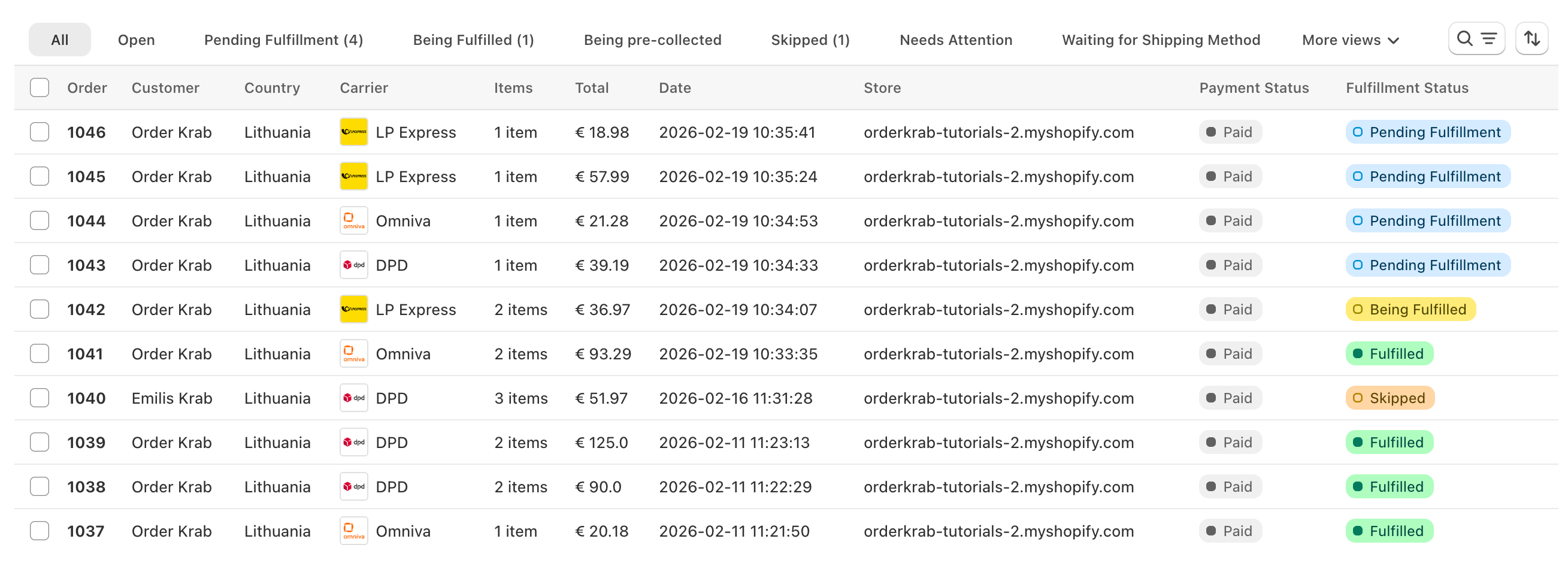
Užsakymai iš jūsų parduotuvės patenka į vieną sąrašą, kuriame galite juos filtruoti, ieškoti ir su jais dirbti. Iš ten spausdinate lipdukus arba pradedate Pick & Pack nešokinėdami tarp programų.
Paieška
Įveskite užsakymo numerį, kliento vardą, el. paštą arba sekimo kodą. Rezultatai rodomi jau rašant.
Rodiniai ir būsenos
Perjunkite tarp „Visi“, „Atviri“, „Neįvykdyti“ ir „Archyvuoti“ arba atidarykite vieną būseną, pavyzdžiui, „Reikia dėmesio“. Kiekviename rodinyje užsakymų skaičius rodomas realiu laiku.
Filtrai, rikiavimas ir stulpeliai
Filtruokite pagal parduotuvę, vežėją, vietą arba žymą. Rikiuokite pagal datą arba užsakymo numerį. Pasirinkite, kuriuos stulpelius norite matyti. OrderKrab įsimena jūsų rodinį.
Masiniai veiksmai
Pasirinkite užsakymus ir atlikite veiksmą su visais iš karto: sukurkite siuntų lipdukus, atsisiųskite juos vienu PDF failu, pažymėkite užsakymus kaip įvykdytus arba juos archyvuokite.
OrderKrab rodo tik tuos veiksmus, kurie tinka kiekvienam pasirinktam užsakymui, todėl net pasirinkus skirtingus užsakymus nieko netinkamo neįvyks.
Būsenos
Ką reiškia skirtingos būsenos?
Kiekvienas užsakymas turi būseną, kuri parodo, kas vyks toliau ir kokie veiksmai galimi. Pagrindinį kelią sudaro penki žingsniai. Visa kita – šalutinis kelias, iš kurio užsakymas grįžta į pagrindinį.
Pagrindinis kelias
- Apdorojama
Sistema ruošia šį užsakymą.
- Laukiama siuntimo būdo
Užsakymas yra OrderKrab sistemoje, bet dar neturi siuntimo būdo.
- Laukiama pakavimo
Užsakymas yra pakavimo eilėje ir dar niekas jo nepradėjo.
- Pakuojama
Kažkas šiuo metu renka arba pakuoja šį užsakymą.
- Įvykdyta
Užsakymas išsiųstas arba klientas jį atsiėmė.
Kitos būsenos:
- Reikia dėmesio
- Prekės neparuoštos
- Praleista
- Laukiama apmokėjimo
- Negalima apdoroti
- Laukiama rinkimo
- Renkama
- Pakeliui į parduotuvę
- Paruošta atsiimti
- Atšaukta
- Grąžinti pinigai
„Įvykdyta“ reiškia supakuota ir perduota vežėjui, o ne pristatyta. Norėdami sekti siuntinį, naudokite užsakyme nurodytą sekimo kodą.
Krab AI paaiškina painias vežėjų klaidas ir ištaiso jas vienu paspaudimu
Vežėjų sistemos grąžina klaidas, tokias kaip "size must be between 0 and 50", kurios jūsų komandai nieko nepasako. Krab AI žino, ką kiekvienas vežėjas turi omenyje, paaiškina problemą paprastais žodžiais ir pasiūlo pataisymą, kurį pritaikote vienu paspaudimu. Užsakymai juda toliau, o ne stringa.
- Atmetimą pastebi iš karto
- Pasiūlo tikslų pataisymą
- Kontrolė lieka jums
Vienas užsakymas
Atidarykite užsakymą ir rasite viską
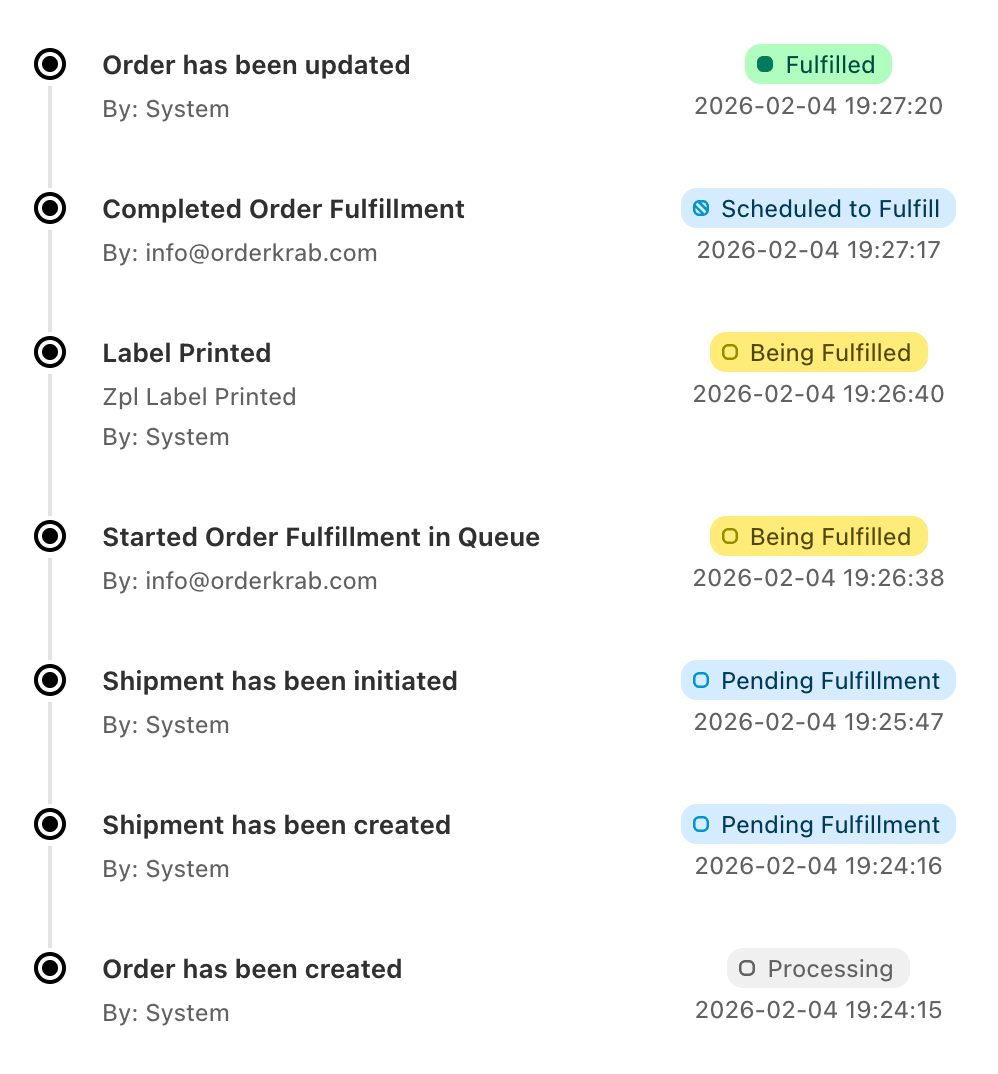
Siuntimas, prekės, klientas, komentarai ir kiekvieno veiksmo istorija yra viename puslapyje. Pagrindinis mygtukas keičiasi pagal būseną, todėl iki kito žingsnio visada tik vienas paspaudimas.
Siuntimas
Pasirinkite arba pakeiskite siuntimo būdą iš tam adresui galimų tarifų. Pataisykite adresą, pasirinkite kitą paštomatą arba užpildykite muitinės laukus.
Klientas
Pataisykite užsakyme nurodytą vardą arba el. paštą. Rizikos ženklelis ir įmonės ženklelis parodo, kam siunčiate.
Prekės
Redaguokite varianto tekstą, eilutės kainą arba vieneto svorį. Archyvuokite prekę, kurios nereikia pakuoti.
Komentarai
Palikite pastabą komandai ir, jei reikia, tuo pačiu metu praleiskite užsakymą. Komentarai rodomi ir Pick & Pack ekrane.
Veiksmų istorija
Kiekvienas žingsnis įrašomas nurodant, kas ir kada jį atliko: sukurta siunta, atspausdintas lipdukas, supakuota, išsiųsta, grąžinta.
Siuntos
Pridėkite antrą siuntinį su atskiru lipduku ir sekimo kodu arba sukurkite grąžinimo lipduką su vežėju, kurį pasirinkote tai šaliai.
Kaip tai veikia praktiškai
Daugiau nei sąrašas. Detali kiekvieno užsakymo kontrolė.
Trys valdikliai susitvarko su painiomis tikro vykdymo dalimis, todėl jūsų komandos darbas nesulėtėja.
Nėra ko pakuoti
Užsakymai, kurių nereikia pakuoti, nepatenka į eilę
Užsakymai, kuriuose nėra ko siųsti, pavyzdžiui, skaitmeninės prekės, gauna būseną „Negalima apdoroti“. Užsakymai su atsiėmimu parduotuvėje įkeliami tik tada, kai įjungiate jiems skirtą nustatymą. Abiejų rūšių užsakymus galite paslėpti užsakymų sąraše ir analitikoje, todėl eilėje lieka tik tie užsakymai, kuriuos kažkas turi supakuoti.
Siuntimo būdas vėliau
Priimkite užsakymus dabar, siuntimą pasirinkite vėliau
Užsakymai gali ateiti į OrderKrab be siuntimo būdo, o vežėją ar pasirinkimą parenkate vėliau. Tai padeda, kai norite išlaikyti mažesnes siuntimo išlaidas. Taip pat galite nusistatyti siuntimo taisykles, kurios tvarkytų dažnai priimamus sprendimus.
Išankstiniai užsakymai ir gamyba
Išankstiniai užsakymai ir prekės, gaminamos pagal užsakymą
Užsakymus galite pažymėti taip, kad jie nepatektų į pakavimo eilę, kol prekės nebus paruoštos siųsti. Naudokite tai išankstiniams užsakymams ir prekėms, gaminamoms pagal užsakymą. Jie lieka matomi sąraše ir į eilę įsijungia tik tada, kai esate pasiruošę.
Taip pat galite žymėti kiekvienos pagal užsakymą gaminamos prekės eigą, kad komanda žinotų, kaip su ja sekasi, dar prieš jai patenkant į eilę.
Mobilioji programėlė
Tie patys užsakymai jūsų telefone
OrderKrab programėlėje, skirtoje iOS ir Android, yra visas užsakymų sąrašas su paieška, parduotuvių ir vežėjų filtrais bei būsenų rodiniais. Atidarykite užsakymą ir matysite siuntą, klientą, prekes, komentarus ir veiksmų istoriją. Pakeiskite jo būseną arba pataisykite kliento duomenis tiesiai programėlėje.


Planai
Užsakymų valdymas įeina į kiekvieną planą
Užsakymų sąrašas, būsenos, masiniai veiksmai, veiksmų istorija ir mobilioji programėlė įeina į Labels ir Pro planus. Krab AI, Pick & Pack ir analitika yra Pro plane. FREE plane gaunate visą Pro iki 50 užsakymų per mėnesį.