


Visi pasūtījumi no visiem veikaliem vienā sarakstā
Pasūtījumi no jūsu pievienotā veikala nonāk OrderKrab, tāpēc jums ir viena vieta, kur tos redzēt, filtrēt un ar tiem strādāt.
- Shopify un WooCommerce
- Neierobežots veikalu skaits vienā kontā
- Meklēšana, filtri, masveida darbības
- Iekļauts katrā plānā
Pasūtījumi
Visi veikali
- 1046Gaida iepakošanu
Ieva K.
krab-store.myshopify.com
- 1045Gaida iepakošanu
Tomas B.
krab-store.myshopify.com
- 1044Nepieciešama uzmanība
Anna S.
krabstore.lt
- 1043Izpildīts
Jonas P.
krabstore.lt




Atlasīti: 2
Pasūtījumu saraksts
Visi pasūtījumi vienuviet
Pasūtījumi no jūsu veikala nonāk vienā sarakstā, kurā tos varat filtrēt, meklēt un ar tiem strādāt. No turienes drukājat uzlīmes vai sākat Pick & Pack, nepārslēdzoties starp lietotnēm.
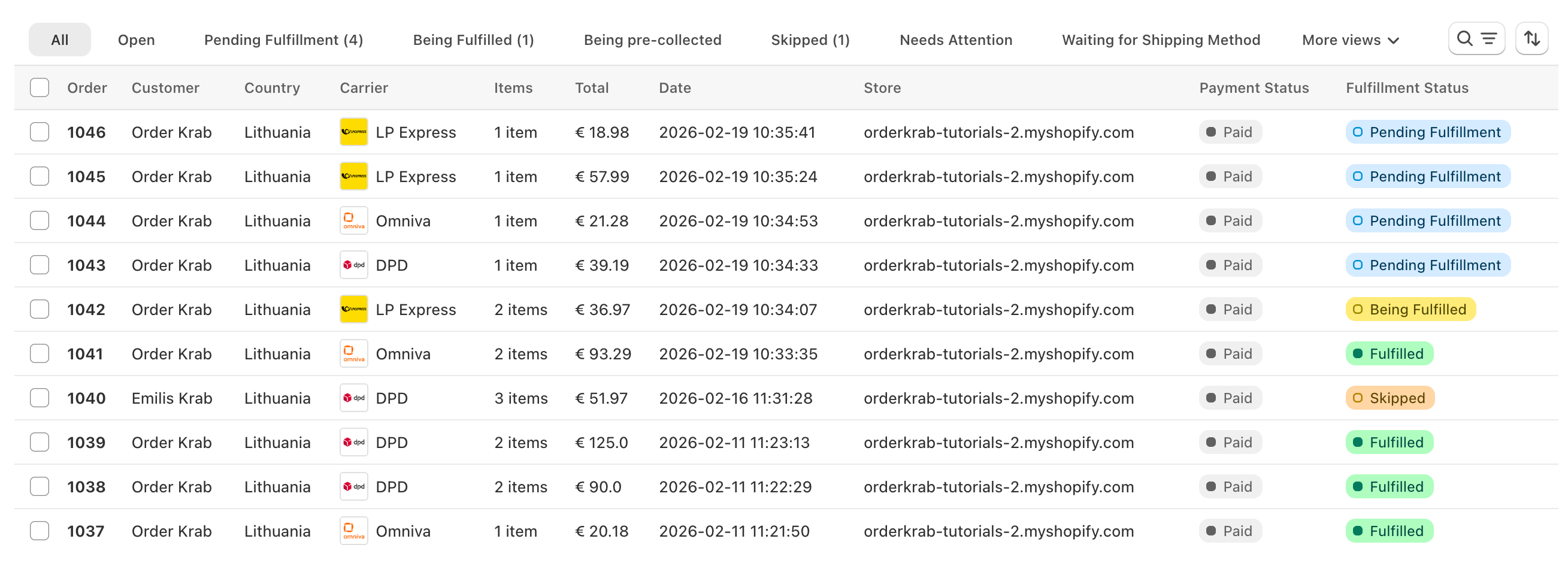
Meklēšana
Ierakstiet pasūtījuma numuru, klienta vārdu, e-pastu vai izsekošanas kodu. Rezultāti parādās, kamēr rakstāt.
Skati un statusi
Pārslēdzieties starp skatiem "Visi", "Atvērtie", "Neizpildītie" un "Arhivētie" vai atveriet vienu statusu, piemēram, "Nepieciešama uzmanība". Katrs skats rāda aktuālo skaitu.
Filtri, kārtošana un kolonnas
Filtrējiet pēc veikala, pārvadātāja, vietas vai taga. Kārtojiet pēc datuma vai pasūtījuma numura. Izvēlieties kolonnas, kuras vēlaties redzēt. OrderKrab atceras jūsu skatu.
Masveida darbības
Atlasiet pasūtījumus un veiciet darbību ar visiem uzreiz: izveidojiet sūtījumu uzlīmes, lejupielādējiet tās vienā PDF failā, atzīmējiet pasūtījumus kā izpildītus vai arhivējiet tos.
OrderKrab rāda tikai tās darbības, kas der katram atlasītajam pasūtījumam, tāpēc ar jauktu atlasi nekad nenotiek nekas nepareizs.
Statusi
Ko nozīmē dažādie statusi?
Katram pasūtījumam ir statuss, kas pasaka, kas notiks tālāk un kādas darbības ir pieejamas. Galvenajā ceļā ir pieci soļi. Viss pārējais ir blakusceļš, no kura pasūtījums atgriežas.
Galvenais ceļš
- Tiek apstrādāts
Sistēma sagatavo šo pasūtījumu.
- Gaida sūtīšanas veidu
Pasūtījums ir OrderKrab sistēmā, bet tam vēl nav sūtīšanas veida.
- Gaida iepakošanu
Pasūtījums ir iepakošanas rindā, un neviens to vēl nav sācis.
- Tiek iepakots
Kāds šobrīd savāc vai iepako šo pasūtījumu.
- Izpildīts
Pasūtījums ir nosūtīts vai klients to ir saņēmis.
Citi statusi:
- Nepieciešama uzmanība
- Preces nav gatavas
- Izlaists
- Gaida apmaksu
- Nevar apstrādāt
- Gaida savākšanu
- Tiek savākts
- Ceļā uz veikalu
- Gatavs saņemšanai
- Atcelts
- Nauda atmaksāta
"Izpildīts" nozīmē, ka pasūtījums ir iepakots un nodots pārvadātājam, nevis piegādāts. Lai sekotu pakai, izmantojiet pasūtījuma izsekošanas kodu.
Krab AI izskaidro neskaidras pārvadātāju kļūdas un salabo tās ar vienu klikšķi
Pārvadātāju sistēmas atgriež kļūdas, tādas kā "size must be between 0 and 50", kas jūsu komandai neko nepasaka. Krab AI zina, ko katrs pārvadātājs ar to domā, izskaidro problēmu vienkāršos vārdos un piedāvā labojumu, ko piemērojat ar vienu klikšķi. Pasūtījumi virzās tālāk, nevis iestrēgst.
- Uzreiz pamana noraidījumu
- Piedāvā precīzu labojumu
- Kontrole paliek jums
Viens pasūtījums
Atveriet pasūtījumu, un tur ir viss
Sūtīšana, preces, klients, komentāri un visu darbību vēsture ir vienā lapā. Galvenā poga mainās līdz ar statusu, tāpēc nākamais solis vienmēr ir viena klikšķa attālumā.
Sūtīšana
Iestatiet vai mainiet sūtīšanas veidu, izvēloties no šai adresei pieejamajām sūtīšanas cenām. Izlabojiet adresi, izvēlieties citu pakomātu vai aizpildiet muitas laukus.
Klients
Izlabojiet vārdu vai e-pastu pasūtījumā. Riska atzīme un uzņēmuma atzīme parāda, kam sūtāt.
Preces
Rediģējiet varianta tekstu, preces cenu vai vienības svaru. Arhivējiet preci, kas nav jāiepako.
Komentāri
Atstājiet piezīmi komandai ar iespēju vienlaikus izlaist pasūtījumu. Komentāri redzami arī Pick & Pack ekrānā.
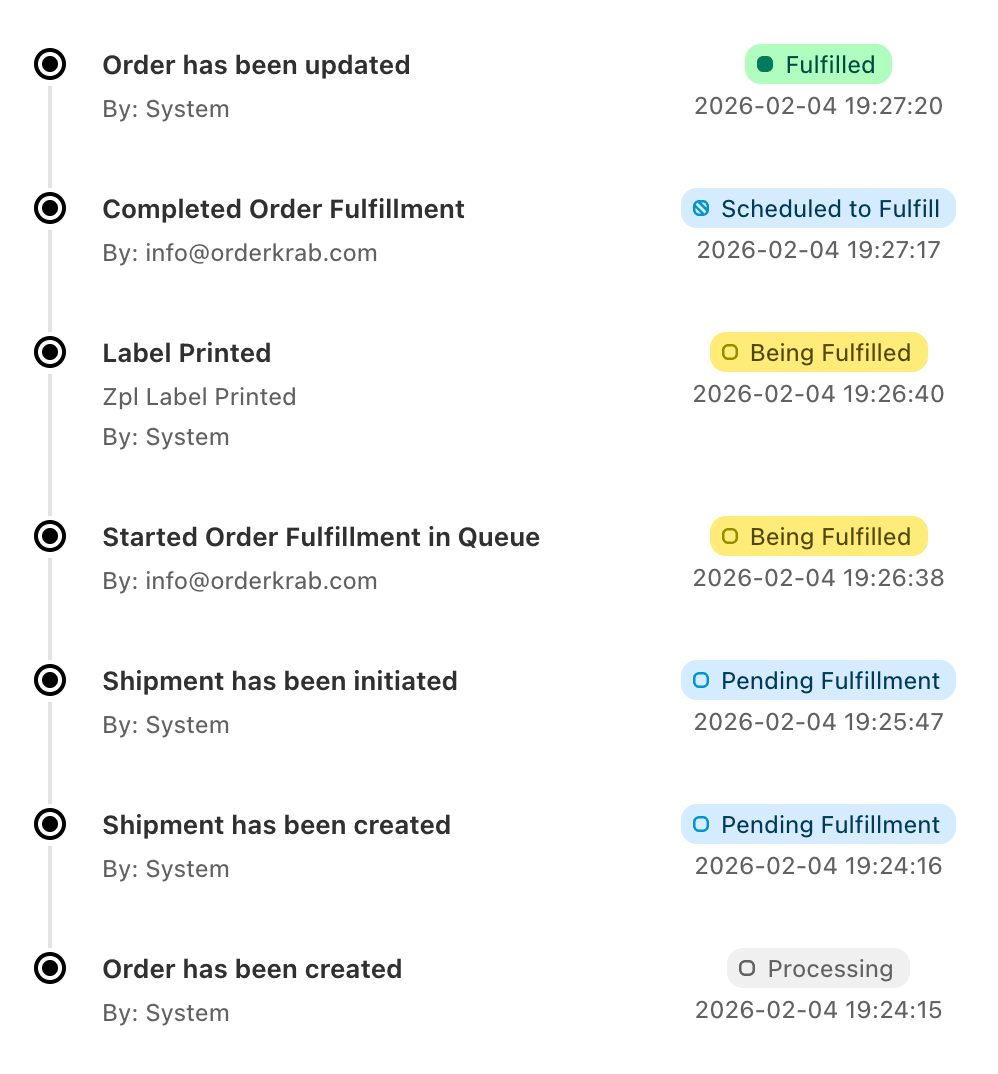
Darbību vēsture
Katrs solis tiek reģistrēts ar to, kas un kad to izdarīja: sūtījums izveidots, uzlīme izdrukāta, iepakots, nosūtīts, atgriezts.
Sūtījumi
Pievienojiet otru paku ar savu uzlīmi un izsekošanas kodu vai izveidojiet atgriešanas uzlīmi ar pārvadātāju, kuru izvēlējāties šai valstij.
Kā tas darbojas praksē
Vairāk nekā saraksts. Detalizēta kontrole pār katru pasūtījumu.
Trīs vadīklas tiek galā ar sarežģītākajām īstas izpildes daļām, lai jūsu komandas darbs nepalēninātos.
Nav ko iepakot
Pasūtījumi, kurus nav jāiepako, paliek ārpus rindas
Pasūtījumi, kuros nav ko sūtīt, piemēram, digitālās preces, saņem statusu "Nevar apstrādāt". Pasūtījumi ar saņemšanu veikalā tiek ielādēti tikai tad, ja ieslēdzat attiecīgo iestatījumu. Abu veidu pasūtījumus varat paslēpt no pasūtījumu saraksta un no analītikas, lai rindā būtu tikai pasūtījumi, kas kādam jāiepako.
Sūtīšanas veidu izvēlas vēlāk
Pieņemiet pasūtījumus tagad, sūtīšanu izvēlieties vēlāk
Pasūtījumi var nonākt OrderKrab bez sūtīšanas veida, un pārvadātāju vai izvēli izvēlaties vēlāk. Tas palīdz, kad vēlaties saglabāt zemākas sūtīšanas izmaksas. Varat arī iestatīt sūtīšanas noteikumus, kas kārtotu bieži pieņemtos lēmumus.
Priekšpasūtījumi un izgatavošana
Priekšpasūtījumi un pēc pasūtījuma gatavotas preces
Pasūtījumus varat atzīmēt tā, lai tie nenonāktu iepakošanas rindā, kamēr preces nav gatavas nosūtīšanai. Izmantojiet to priekšpasūtījumiem un pēc pasūtījuma gatavotām precēm. Tie paliek redzami sarakstā un rindā pievienojas tikai tad, kad esat gatavi.
Varat arī atzīmēt katras pēc pasūtījuma gatavotas preces gaitu, lai komanda zinātu, kā tai klājas, vēl pirms tā nonāk rindā.
Mobilā lietotne
Tie paši pasūtījumi jūsu telefonā
OrderKrab lietotnē iOS un Android ierīcēm ir pilns pasūtījumu saraksts ar meklēšanu, veikalu un pārvadātāju filtriem un statusu skatiem. Atveriet pasūtījumu, lai redzētu sūtījumu, klientu, preces, komentārus un darbību vēsturi. Mainiet tā statusu vai izlabojiet klienta datus tieši lietotnē.


Plāni
Pasūtījumu pārvaldība ir katrā plānā
Pasūtījumu saraksts, statusi, masveida darbības, darbību vēsture un mobilā lietotne ir iekļauti Labels un Pro plānos. Krab AI, Pick & Pack un analītika ir Pro plānā. FREE plānā saņemat visu Pro līdz 50 pasūtījumiem mēnesī.