


Iga tellimus igast poest ühes nimekirjas
Teie ühendatud poe tellimused jõuavad OrderKrabi, nii et teil on üks koht, kus neid näha, filtreerida ja nendega tegeleda.
- Shopify ja WooCommerce
- Piiramatult poode ühel kontol
- Otsing, filtrid, hulgitoimingud
- Sisaldub igas paketis
Tellimused
Kõik poed
- 1046Ootab pakkimist
Ieva K.
krab-store.myshopify.com
- 1045Ootab pakkimist
Tomas B.
krab-store.myshopify.com
- 1044Vajab tähelepanu
Anna S.
krabstore.lt
- 1043Täidetud
Jonas P.
krabstore.lt




Valitud: 2
Tellimuste nimekiri
Kõik tellimused ühes kohas
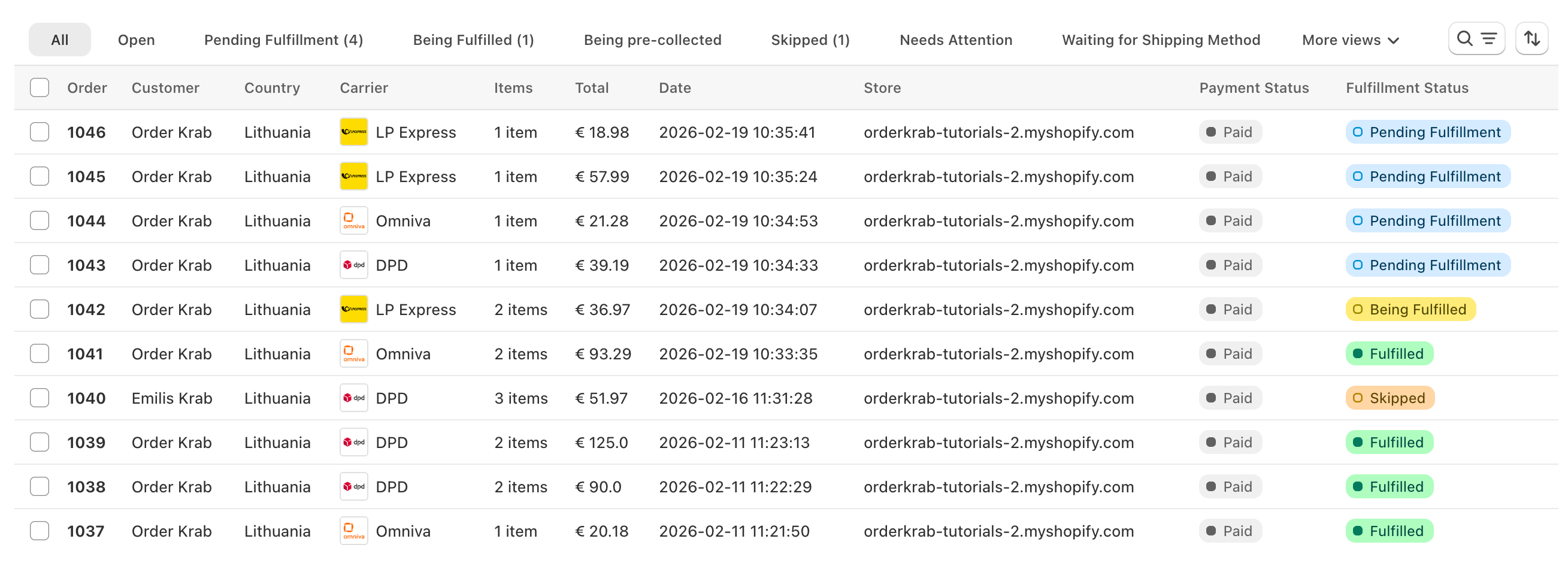
Teie poe tellimused jõuavad ühte nimekirja, kus saate neid filtreerida, otsida ja nendega tegeleda. Sealt prindite saatelipikuid või alustate Pick & Packi, ilma rakendusi vahetamata.
Otsing
Sisestage tellimuse number, kliendi nimi, e-posti aadress või jälgimiskood. Tulemused ilmuvad kirjutamise ajal.
Vaated ja staatused
Lülituge vaadete „Kõik“, „Avatud“, „Täitmata“ ja „Arhiveeritud“ vahel või avage üks staatus, näiteks „Vajab tähelepanu“. Iga vaade näitab tellimuste arvu reaalajas.
Filtrid, sortimine ja veerud
Filtreerige poe, vedaja, asukoha või märgendi järgi. Sortige kuupäeva või tellimuse numbri järgi. Valige veerud, mida soovite näha. OrderKrab jätab teie vaate meelde.
Hulgitoimingud
Valige tellimused ja tehke toiming kõigiga korraga: looge saatelipikud, laadige need alla ühe PDF-ina, märkige tellimused täidetuks või arhiveerige need.
OrderKrab näitab ainult toiminguid, mis sobivad kõigile valitud tellimustele, nii et erinevaid tellimusi koos valides ei lähe kunagi midagi valesti.
Staatused
Mida erinevad staatused tähendavad?
Igal tellimusel on staatus, mis ütleb, mis edasi juhtub ja millised toimingud on saadaval. Põhirajal on viis sammu. Kõik muu on kõrvalrada, kust tellimus tagasi tuleb.
Põhirada
- Töötlemisel
Süsteem valmistab seda tellimust ette.
- Ootab saatmisviisi
Tellimus on OrderKrabis, aga sellel ei ole veel saatmisviisi.
- Ootab pakkimist
Tellimus on pakkimisjärjekorras ja keegi ei ole seda veel alustanud.
- Pakitakse
Keegi korjab või pakib seda tellimust praegu.
- Täidetud
Tellimus on välja saadetud või klient on selle kätte saanud.
Muud staatused:
- Vajab tähelepanu
- Tooted ei ole valmis
- Vahele jäetud
- Ootab makset
- Ei saa töödelda
- Ootab korjamist
- Korjatakse
- Teel poodi
- Valmis kättesaamiseks
- Tühistatud
- Raha tagastatud
„Täidetud“ tähendab, et tellimus on pakitud ja vedajale üle antud, mitte kohale toimetatud. Paki jälgimiseks kasutage tellimusel olevat jälgimiskoodi.
Krab AI selgitab segaseid vedajate vigu ja parandab need ühe klikiga
Vedajate süsteemid tagastavad vigu nagu "size must be between 0 and 50", mis teie meeskonnale midagi ei ütle. Krab AI teab, mida iga vedaja sellega mõtleb, selgitab probleemi lihtsate sõnadega ja pakub paranduse, mille saate ühe klikiga rakendada. Tellimused liiguvad edasi, mitte ei jää toppama.
- Märkab tagasilükkamise kohe
- Pakub täpse paranduse
- Kontroll jääb teile
Üks tellimus
Avage tellimus ja kõik on olemas
Saatmine, tooted, klient, kommentaarid ja kõigi toimingute ajajoon on ühel lehel. Põhinupp muutub koos staatusega, nii et järgmine samm on alati ühe kliki kaugusel.
Saatmine
Määrake või muutke saatmisviisi selle aadressi jaoks saadaolevate saatmishindade hulgast. Parandage aadress, valige teine pakiautomaat või täitke tolliväljad.
Klient
Parandage tellimusel nimi või e-posti aadress. Riskimärgis ja ettevõtte märgis näitavad, kellele te saadate.
Tooted
Muutke variandi teksti, rea hinda või ühiku kaalu. Arhiveerige toode, mida ei peaks pakkima.
Kommentaarid
Lisage meeskonnale märkus ja soovi korral jätke tellimus samal ajal vahele. Kommentaarid on näha ka Pick & Packis.
Toimingute ajajoon
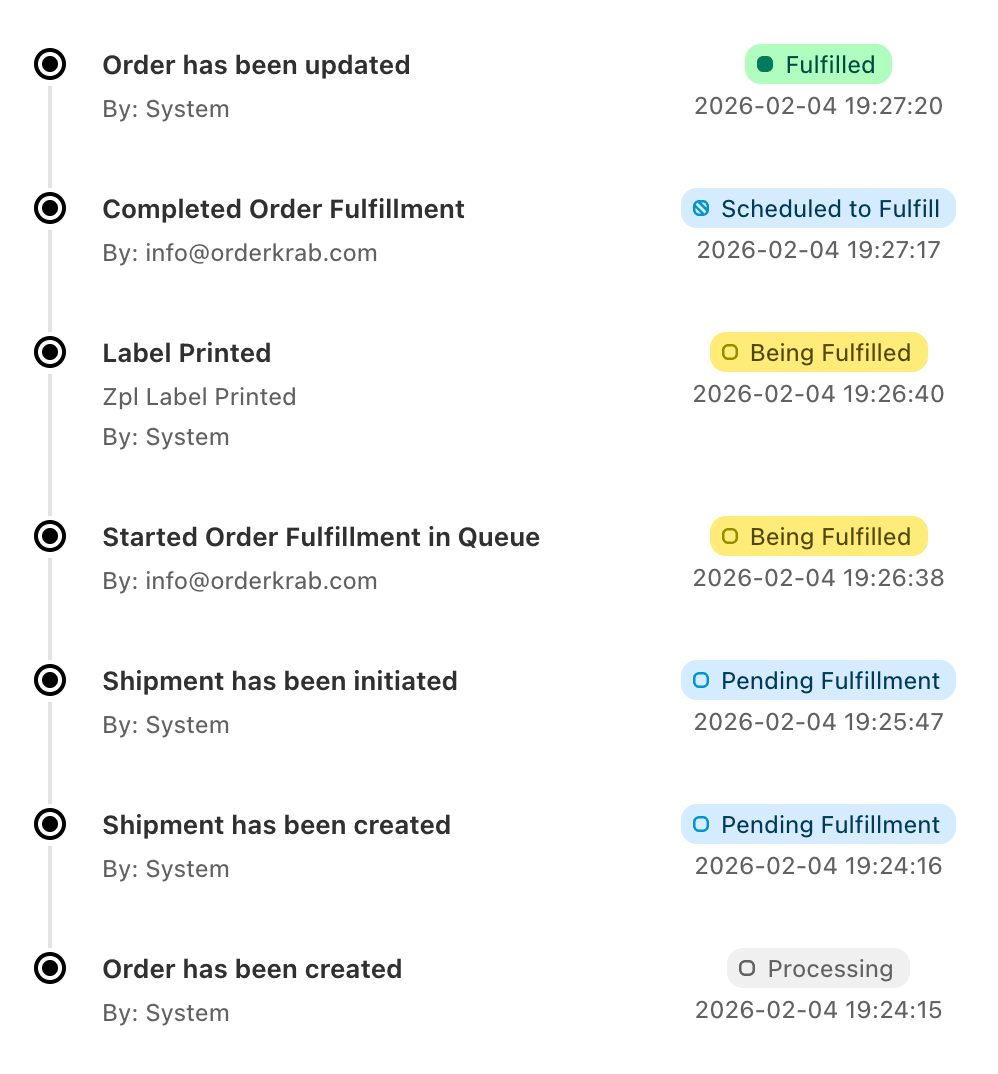
Iga samm logitakse koos sellega, kes selle tegi ja millal: saadetis loodud, saatelipik prinditud, pakitud, saadetud, tagastatud.
Saadetised
Lisage teine pakk, millel on oma saatelipik ja jälgimiskood, või looge tagastussilt vedajaga, mille olete selle riigi jaoks valinud.
Kuidas see praktikas töötab
Rohkem kui nimekiri. Põhjalik kontroll iga tellimuse üle.
Kolm juhtnuppu tegelevad tõelise täitmise segasemate osadega, et teie meeskond ei aeglustuks.
Pole midagi pakkida
Tellimused, mida pole vaja pakkida, jäävad järjekorrast välja
Tellimused, milles pole midagi saata, näiteks digitaalsed tooted, saavad staatuse „Ei saa töödelda“. Poest kättesaamise tellimused laaditakse ainult siis, kui te selle valiku sisse lülitate. Mõlemad saate peita tellimuste nimekirjast ja analüütikast, nii et järjekorras on ainult tellimused, mida keegi peab pakkima.
Saatmisviis hiljem
Võtke tellimused vastu kohe, valige saatmine hiljem
Tellimused võivad jõuda OrderKrabi ilma saatmisviisita ja te valite vedaja või valiku hiljem. See aitab, kui soovite saatmiskulusid madalal hoida. Saate ka seadistada saatmisreegleid, mis tegeleksid sageli tehtavate otsustega.
Eeltellimused ja tellimustööd
Eeltellimused ja tellimuse järgi valmistatavad tooted
Saate tellimusi märkida nii, et need ei satu pakkimisjärjekorda enne, kui tooted on saatmiseks valmis. Kasutage seda eeltellimuste ja tellimuse järgi valmistatavate toodete puhul. Need jäävad nimekirjas nähtavaks ja liituvad järjekorraga alles siis, kui te olete valmis.
Saate ka iga tellimuse järgi valmistatava toote edenemist märkida, et meeskond teaks, kus see on, enne kui see järjekorda jõuab.
Mobiilirakendus
Samad tellimused teie telefonis
OrderKrabi rakenduses iOS-ile ja Androidile on täielik tellimuste nimekiri koos otsingu, poe- ja vedajafiltrite ning staatuste vaadetega. Avage tellimus, et näha saadetist, klienti, tooteid, kommentaare ja ajajoont. Muutke selle staatust või parandage kliendi andmeid otse rakenduses.


Paketid
Tellimuste haldus on igas paketis
Tellimuste nimekiri, staatused, hulgitoimingud, toimingute ajajoon ja mobiilirakendus on Labels ja Pro paketis. Krab AI, Pick & Pack ja analüütika on Pro paketis. FREE paketis saate kogu Pro kuni 50 tellimuse jaoks kuus.